

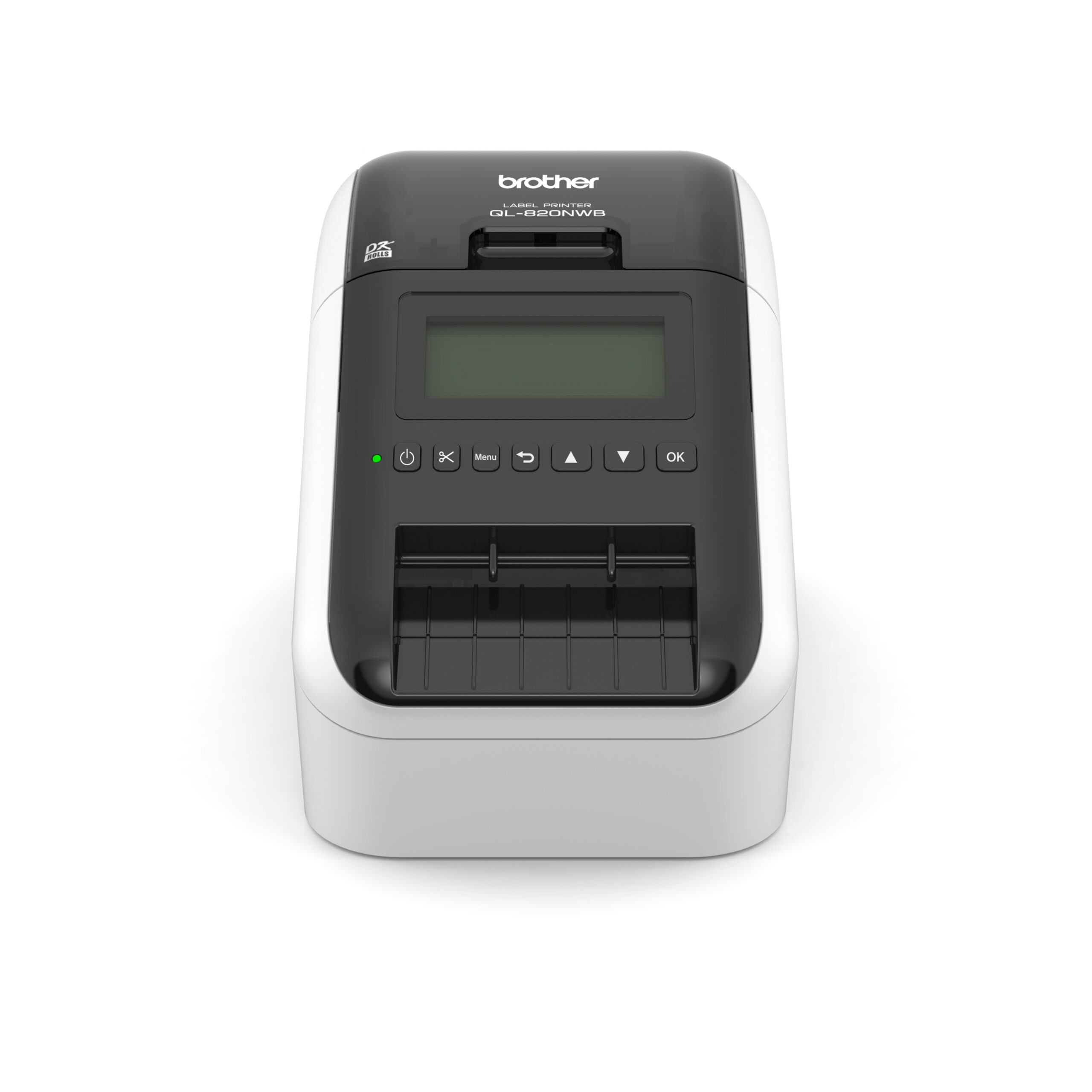
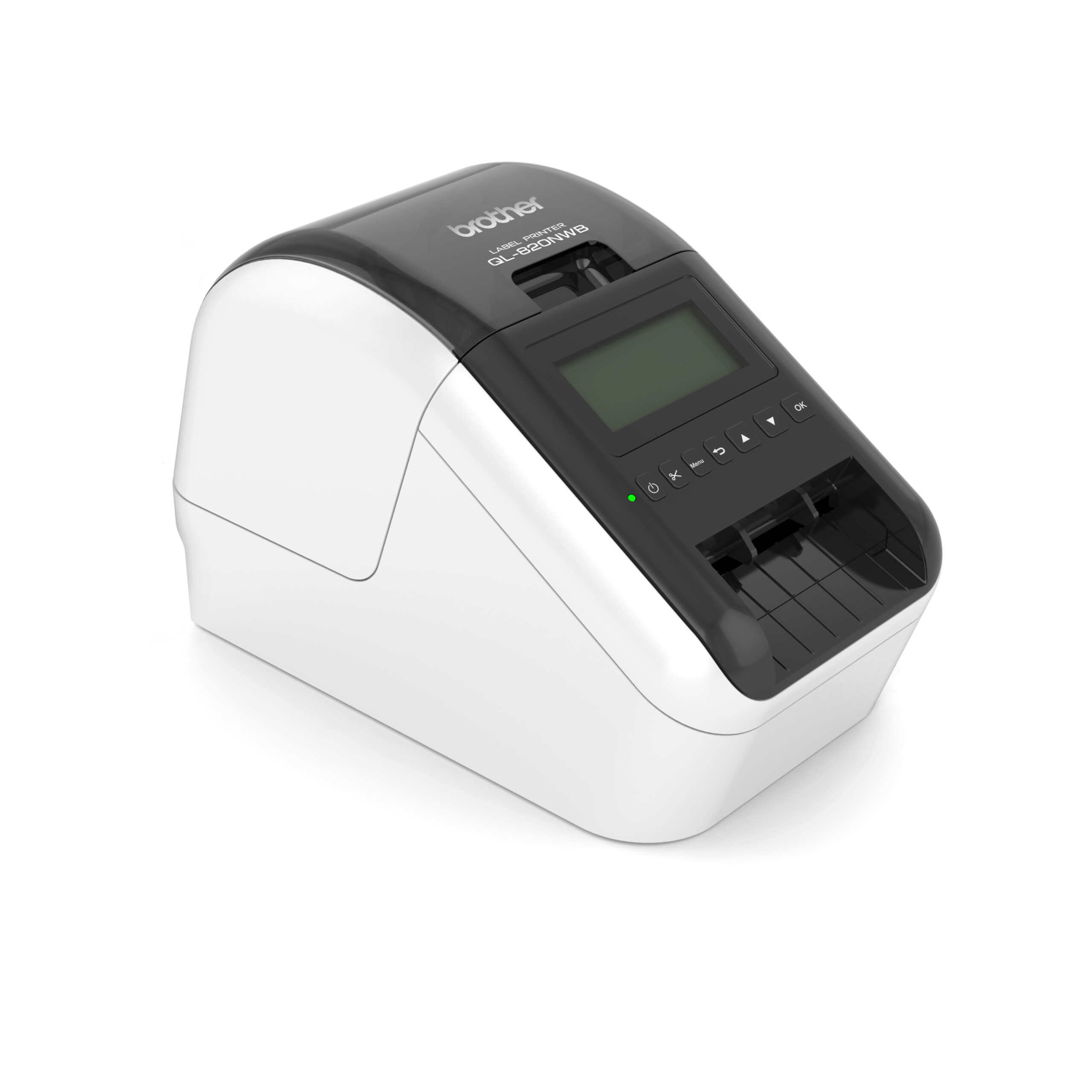


Brother QL-820NWB Network wireless Label and Barcode Printer


KSh 40,000.00 (+ VAT(16%)
- Print technology: Direct thermal
- Maximum print resolution: 300 × 600 dpi (Super Fine mode)
- Standard print resolution: 300 dpi
- Maximum print speed: Up to 110 standard address labels per minute
- Maximum print width: Up to 62 mm
- Maximum media width: Up to 62 mm
- Compatible media: Brother DK rolls (continuous and pre-cut labels)
- Dual-colour printing: Black and red on compatible Brother DK rolls
- Interfaces:
- USB
- Gigabit Ethernet
- Wi-Fi (IEEE 802.11b/g/n)
- Bluetooth
- Wireless printing support:
- Apple AirPrint
- Brother iPrint&Label
- Wireless network printing
- Mobile operating systems:
- Android
- iOS
- Desktop operating systems:
- Windows
- macOS
- Label design software:
- P-touch Editor
- Brother iPrint&Label
- Barcode formats supported:
- CODE39
- CODE128
- EAN-8
- EAN-13
- UPC-A
- UPC-E
- ITF
- Codabar
- GS1 DataBar
- QR Code
- Data Matrix
- PDF417
- MaxiCode
- Micro QR
- Automatic cutter: Yes
- Connectivity sharing: Multi-user network support
- Power supply: AC adapter
- Colour: Black
- Manufacturer: Brother
- Ideal applications:
- Shipping labels
- Barcode labels
- Product labels
- Address labels
- File folder labels
- Visitor badges
- Retail shelf labels
- Warehouse inventory labels
- Asset management labels
- Office organisation labels
Brother QL-820NWB Network Wireless Label and Barcode Printer
Brother QL-820NWB label printer is a professional, high-speed desktop Brother thermal label printer designed for offices, warehouses, retail stores, logistics companies, healthcare facilities, schools, supermarkets, courier companies and businesses that require fast, reliable and professional label printing.
If you are looking to Buy Brother QL-820NWB Kenya, Fedi Office Supplies supplies the Brother QL-820NWB Network Wireless Label and Barcode Printer with nationwide delivery in Kenya.
Brother QL-820NWB is a versatile Brother QL-820NWB wireless label printer with Wi-Fi, Bluetooth, USB and Ethernet connectivity. It uses direct thermal printing, meaning you do not need ink cartridges or toner to print your labels. It can print labels at speeds of up to 176 mm/sec and supports Brother DK label rolls up to 62 mm wide.
Brother QL-820NWB Key Features
Fast Brother Thermal Label Printer
Brother QL-820NWB is a high-speed Brother thermal label printer capable of printing at up to 176 mm/sec. This makes it suitable for businesses printing large quantities of labels throughout the day.
It uses direct thermal technology, so there is no need for ink or toner. This helps reduce ongoing printing costs and makes the printer easy to maintain.
Brother QL-820NWB Bluetooth WiFi Label Printer
Brother QL-820NWB Bluetooth WiFi label printer provides several connectivity options, allowing businesses to print from computers, mobile devices and networked systems.
Connectivity includes:
- Wi-Fi 802.11 b/g/n
- Wi-Fi Direct
- Bluetooth
- USB 2.0
- USB Host
- 10/100 Mbps Ethernet
This makes the QL-820NWB ideal for offices and businesses that need both wireless and wired label printing.
Brother QL-820NWB USB Ethernet WiFi Connectivity
Brother QL-820NWB USB Ethernet WiFi connectivity options make it easy to integrate the printer into different working environments.
You can connect the printer directly to a computer using USB, connect it to an office network using Ethernet, or use Wi-Fi and Bluetooth for wireless printing.
Brother QL-820NWB Barcode Printer
Brother QL-820NWB barcode printer is suitable for printing a wide range of barcode labels for inventory management, retail, warehousing, logistics and asset identification.
It can be used for:
- Product barcode labels
- Inventory labels
- Asset identification
- Warehouse labels
- Shipping labels
- Retail labels
- File and folder labels
- Equipment labels
- Visitor identification
- Address labels
Brother QL-820NWB Shipping Label Printer
Brother QL-820NWB shipping label printer is suitable for courier companies, e-commerce businesses, online stores and logistics departments that need to print shipping and address labels quickly.
Its fast printing speed and automatic cutter make it convenient for high-volume label printing.
Brother QL-820NWB DK Labels Kenya
The printer uses Brother QL-820NWB DK labels Kenya users can easily source for different applications. Brother DK media is available in different pre-sized labels and continuous rolls.
The printer supports label widths up to 62 mm, with a maximum printing width of approximately 58 mm. DK rolls can be used for address labels, barcode labels, shipping labels, product labels and other professional labeling requirements.
When purchasing the printer, you can also ask Fedi Office Supplies about compatible Brother QL-820NWB label roll options.
Brother QL-820NWB Label Roll
Brother QL-820NWB label roll system makes it easy to change between different label sizes and formats depending on the application.
The printer supports Brother DK die-cut labels and continuous rolls. Certain DK continuous rolls also support two-colour black/red printing for applications requiring attention-grabbing labels.
High-Resolution Label Printing
QL-820NWB features 300 dpi printing with a high-resolution mode of up to 300 × 600 dpi. This produces clear text, graphics, barcodes and small fonts.
Automatic Label Cutter
The built-in automatic cutter allows users to cut individual labels or continuous labels after printing. This is particularly useful when printing multiple labels in batches.
LCD Display and Standalone Printing
Brother QL-820NWB includes a backlit LCD display and controls that allow users to perform certain printing operations without constantly relying on a connected computer.
This is useful for quick, repetitive label-printing tasks.
Brother QL-820NWB Applications
Brother QL-820NWB can be used across many industries and business environments.
Offices
Use the printer to create:
- File labels
- Folder labels
- Address labels
- Visitor badges
- Name labels
- Asset labels
- Storage labels
- Document identification labels
Warehouses
Brother QL-820NWB barcode printer is ideal for warehouse labeling applications such as:
- Inventory identification
- Shelf labels
- Product identification
- Stock management
- Barcode labeling
- Bin labels
- Asset tracking
Retail Shops and Supermarkets
The printer can be used for:
- Product labels
- Price labels
- Barcode labels
- Shelf labels
- Promotional labels
- Stock identification
Courier and Logistics Companies
Brother QL-820NWB shipping label printer can be used for:
- Shipping labels
- Address labels
- Package identification
- Delivery labels
- Tracking labels
- Dispatch labels
E-commerce Businesses
Online stores can use the QL-820NWB for printing customer addresses, parcel labels, order identification labels and shipping labels.
Food and Hospitality
The printer can be used for food identification, kitchen labels, storage labels, visitor badges and other organizational applications. Compatible two-colour black/red DK continuous media can also be useful where attention-grabbing labels are required.
Healthcare
Healthcare facilities can use the printer for:
- File identification
- Patient administration labels
- Equipment labels
- Storage labels
- Sample identification
- Asset identification
Brother QL-820NWB Driver
Brother QL-820NWB Driver allows your Windows or Mac computer to communicate with the printer.
For the best printing experience, install the appropriate Brother printer driver and software for your operating system. Brother provides official drivers, software, manuals and troubleshooting resources for the QL-820NWB.
The printer can also be used with Brother P-touch Editor for creating professional labels, barcodes, graphics and customized templates.
Brother QL-820NWB App
Brother QL-820NWB app provides convenient mobile printing capabilities. Brother’s iPrint&Label application supports mobile label creation and printing from compatible iOS and Android devices.
The printer also supports software and SDK options for businesses that want to integrate label printing into existing systems and workflows.
Brother QL-820NWB Specifications
| Specification | Brother QL-820NWB |
| Printer Type | Direct Thermal Label Printer |
| Print Resolution | 300 × 300 dpi; up to 300 × 600 dpi |
| Print Speed | Up to 176 mm/sec |
| Maximum Print Width | Approximately 58 mm |
| Maximum Roll Width | Up to 62 mm |
| Media | Brother DK Labels and Continuous Rolls |
| Wi-Fi | Yes |
| Wi-Fi Direct | Yes |
| Bluetooth | Yes |
| Ethernet | 10/100 Mbps |
| USB | USB 2.0 |
| Automatic Cutter | Yes |
| LCD Display | Backlit LCD |
| Ink/Toner Required | No |
| Optional Battery | Available |
| Dimensions | Approx. 125.3 × 234 × 145 mm |
| Weight | Approx. 1.16 kg |
Brother QL-820NWB vs Brother QL-810W
Brother QL-820NWB is a more connected option compared with the Brother QL-810W. The QL-820NWB adds Bluetooth and Ethernet connectivity alongside Wi-Fi and USB, making it better suited to businesses that require network and mobile printing.
| Feature | Brother QL-820NWB | Brother QL-810W |
| Direct Thermal | Yes | Yes |
| Wi-Fi | Yes | Yes |
| Wi-Fi Direct | Yes | Yes |
| Bluetooth | Yes | No |
| Ethernet | Yes | No |
| USB | Yes | Yes |
| Automatic Cutter | Yes | Yes |
| DK Labels | Yes | Yes |
| Best For | Network, mobile & professional labeling | Wireless desktop labeling |
Brother QL-820NWB vs Brother QL-800
Brother QL-800 is a popular desktop thermal label printer, while the QL-820NWB is designed for users requiring more connectivity and advanced network functionality.
| Feature | Brother QL-820NWB | Brother QL-800 |
| Direct Thermal | Yes | Yes |
| Wi-Fi | Yes | No |
| Bluetooth | Yes | No |
| Ethernet | Yes | No |
| USB | Yes | Yes |
| LCD | Yes | No |
| Automatic Cutter | Yes | Yes |
| DK Labels | Yes | Yes |
| Network Printing | Yes | No |
| Mobile Printing | Yes | Limited/No |
| Best For | Business & network environments | Basic desktop labeling |
How to Change the Brother QL-820NWB Paper Roll
Changing the Brother QL-820NWB label roll is quick and straightforward:
- Switch on the Brother QL-820NWB.
- Open the DK roll compartment cover.
- Remove the existing DK roll if installed.
- Insert the new Brother DK label roll into the roll guides.
- Ensure the roll is positioned correctly and feeds through the label guide.
- Close the DK roll compartment cover.
- Press the cutter/feed button as required to advance the label.
- The printer will automatically detect and feed the media.
- Print a test label to confirm correct alignment.
Always use the correct Brother DK media for the required label size and application.
Why Buy Brother QL-820NWB from Fedi Office Supplies?
Fedi Office Supplies provides professional printer, label printer and office technology solutions in Kenya.
When you Buy Brother QL-820NWB Kenya from Fedi Office Supplies, you can also source genuine Brother DK label rolls and other printer consumables.
Why choose Fedi Office Supplies?
- Genuine Brother products
- Professional technical advice
- Brother label printer and consumables supply
- Same-day delivery in Nairobi subject to order confirmation
- Nationwide delivery across Kenya
- Supply to major towns including Nairobi, Mombasa, Kisumu and other locations
- M-Pesa payment
- Card payment
- Cheque payment
- Business and institutional supply
- LPO orders for qualifying organizations
For the latest Brother QL-820NWB price in Kenya, availability and delivery information, contact Fedi Office Supplies.
Frequently Asked Questions – Brother QL-820NWB
- What is the Brother QL-820NWB?
Brother QL-820NWB is a professional network-enabled desktop label and barcode printer designed for fast printing of labels, barcodes, shipping labels, address labels and other business labels.
- Does Brother QL-820NWB use ink?
No. QL-820NWB uses direct thermal printing technology and does not require ink cartridges or toner.
- What labels does the Brother QL-820NWB use?
The printer uses Brother DK labels and continuous rolls. Compatible media is available in different sizes for address, shipping, barcode, product and general-purpose labeling.
- What is the maximum Brother QL-820NWB label width?
The printer supports Brother DK media up to 62 mm wide, with a maximum printing width of approximately 58 mm.
- Does the Brother QL-820NWB support Wi-Fi?
Yes. Brother QL-820NWB wireless label printer supports Wi-Fi and Wi-Fi Direct.
- Does the Brother QL-820NWB have Bluetooth?
Yes. QL-820NWB supports Bluetooth connectivity for compatible devices and applications.
- Does the Brother QL-820NWB have Ethernet?
Yes. The printer includes 10/100 Mbps wired Ethernet, making it suitable for networked office and business environments.
- Can the Brother QL-820NWB print barcodes?
Yes. QL-820NWB can be used as a Brother QL-820NWB barcode printer for product, inventory, warehouse, asset and shipping barcode labels.
- Can Brother QL-820NWB print shipping labels?
Yes. The printer can be used as a Brother QL-820NWB shipping label printer for address labels, parcel identification and other logistics applications.
- Can I print from my phone using Brother QL-820NWB?
Yes. The QL-820NWB supports mobile printing through compatible Brother applications such as iPrint&Label, subject to device and operating-system compatibility.
- Where can I download the Brother QL-820NWB Driver?
The official Brother support website provides the latest available drivers, software, manuals and troubleshooting resources for the QL-820NWB.
- What is the Brother QL-820NWB app?
Brother iPrint&Label is a mobile application that can be used with compatible Brother label printers for creating and printing labels from supported mobile devices.
- How fast does the Brother QL-820NWB print?
QL-820NWB can print at speeds of up to 176 mm/sec, depending on the media and printing conditions.
- Does Brother QL-820NWB print in colour?
The standard QL-820NWB uses monochrome direct thermal printing. However, compatible Brother DK two-colour black/red continuous media can be used for supported two-colour printing applications.
- Can Brother QL-820NWB print long labels?
Yes. With compatible continuous DK media, the printer can produce custom-length labels and banners.
- Is Brother QL-820NWB suitable for a warehouse?
Yes. Its fast printing, barcode capability, Ethernet, Wi-Fi and Bluetooth connectivity make it suitable for warehouse inventory, asset, shelf, bin and product labeling.
- Is Brother QL-820NWB suitable for a courier company?
Yes. The printer is suitable for address labels, shipping labels, parcel identification and dispatch labeling.
- Where can I buy Brother QL-820NWB in Kenya?
You can Buy Brother QL-820NWB Kenya from Fedi Office Supplies. Contact our sales team for the current Brother QL-820NWB price in Kenya, stock availability, genuine DK labels and delivery options.
Order Brother QL-820NWB in Kenya
Get the professional Brother QL-820NWB label printer from Fedi Office Supplies for reliable, high-speed label and barcode printing.
Whether you need a Brother QL-820NWB wireless label printer, Brother QL-820NWB Bluetooth WiFi label printer, Brother QL-820NWB barcode printer, Brother QL-820NWB shipping label printer or a professional Brother thermal label printer, the QL-820NWB provides the connectivity and performance required for modern business labeling.
Contact Fedi Office Supplies today for the latest Brother QL-820NWB price in Kenya, genuine Brother DK labels, availability and delivery.
Be the first to review “Brother QL-820NWB Network wireless Label and Barcode Printer”
Related products

Printers and Cartridges
Toshiba E-studio 2021AC A3/A4 20ppm Colour MultiFunctional Printer (6AG00010409)


Printers and Cartridges
Epson T9651 WF-C5XXX Series Ink Cartridge XL Black- (C13T965140)


Label Printers
Original Brother TZe-SE4 18mm Black on White Laminated strong self adhesive Security Tape
Printers and Cartridges
Toshiba E-studio 3025AC A3/A4 30ppm Colour MultiFunctional Printer (6AG00010273)


Reviews
There are no reviews yet.