

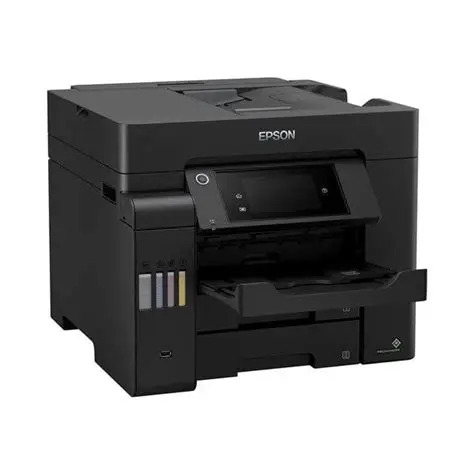
Epson EcoTank L6550 A4 Colour Wi-Fi Duplex All-in-One Ink Tank Printer
KSh 136,000.00 (+ VAT(16%)
- Brand: Epson
- Product series: EcoTank Business
- Model: L6550
- Printer type: A4 colour multifunction ink tank printer
- Functions: Print, scan, copy, and fax
- Printing technology: Epson PrecisionCore Heat-Free printhead
- Ink technology: Epson DURABrite ET pigment ink
- Ink configuration: Four colours: black, cyan, magenta, and yellow
- Ink system: Refillable cartridge-free ink tank system
- Maximum print resolution: Up to 4800 x 2400 dpi
- ISO print speed, black: Up to 25 pages per minute
- ISO print speed, colour: Up to 12 pages per minute
- Draft print speed, black: Up to 32 pages per minute
- Draft print speed, colour: Up to 22 pages per minute
- First-page output time: Approximately 5.5 seconds for black and 9.5 seconds for colour under specified conditions
- Automatic duplex printing: Yes
- Automatic duplex scanning: Yes, through the automatic document feeder
- Automatic document feeder capacity: 50 sheets
- Scanner type: Flatbed colour scanner with Contact Image Sensor (CIS)
- Optical scanning resolution: 1200 x 2400 dpi
- Maximum scan area: 216 x 297 mm
- Front paper trays: Two trays, 250 sheets each
- Rear paper feed capacity: 50 sheets
- Total standard paper input capacity: Up to 550 sheets
- Output tray capacity: Up to 125 sheets
- Supported paper sizes: A4, A5, A6, B5, B6, Letter, Legal, C4, C6, DL, and No. 10 envelopes
- Compatible paper weight: Approximately 64–255 g/m², depending on media path and type
- Connectivity: Wi-Fi, Wi-Fi Direct, Ethernet, and USB
- Mobile printing: Epson Smart Panel, Epson iPrint, and compatible mobile printing services
- Cloud printing: Epson Connect, including Email Print, Remote Print Driver, and Scan to Cloud
- Display: 10.9 cm colour touchscreen
- Replacement ink series: Epson 112
- Replacement black ink yield: Up to 7,500 pages per set under specified conditions
- Replacement colour ink yield: Up to 6,000 pages per set under specified conditions
- Included ink bottle configuration: One 127 ml black bottle and three 70 ml colour bottles in the referenced regional package
- Fax transmission speed: Up to 33.6 kbps
- Fax speed dial: Up to 200 names and numbers
- Fax memory: Up to 550 pages under specified conditions
- Power consumption: Approximately 19 W during standalone copying under the stated test conditions
- Dimensions (W x D x H): Approximately 425 x 500 x 350 mm
- Weight: Approximately 17.5 kg
- Power supply: 220–240 V in the referenced regional configuration
- Recommended use: Small businesses, medium-sized offices, and professional workspaces
Epson EcoTank L6550 A4 Colour Wi-Fi Duplex All-in-One Ink Tank Printer
Epson EcoTank L6550 A4 Colour Wi-Fi Duplex All-in-One Ink Tank Printer is a high-performance business printer designed for offices, small businesses, and professional workspaces that require fast, reliable, and cost-effective document management. This multifunction ink tank printer combines printing, scanning, copying, and faxing in one device, with automatic double-sided printing and scanning to improve productivity. Powered by Epson PrecisionCore Heat-Free technology and DURABrite ET pigment inks, it produces sharp text and professional-quality colour documents while helping reduce running costs through its refillable ink tank system. With ISO print speeds of up to 25 pages per minute in black and 12 pages per minute in colour, a 50-sheet automatic document feeder, two 250-sheet front paper trays, and a 50-sheet rear paper feed, the Epson L6550 handles demanding office workloads efficiently. Wi-Fi, Wi-Fi Direct, Ethernet, USB connectivity, and a 10.9 cm colour touchscreen provide flexible operation, while high-yield replacement ink bottles deliver up to 7,500 black-and-white pages and 6,000 colour pages under Epson’s specified testing conditions.
Product Features
- Four-in-One Multifunction Printing
Epson EcoTank L6550 combines printing, scanning, copying, and faxing in one versatile machine. It is suitable for businesses that regularly process invoices, contracts, reports, forms, and customer correspondence. Its multifunction design helps reduce the need for separate office equipment while keeping everyday document workflows organised.
- Low-Cost Printing with Refillable Ink Tanks
The cartridge-free EcoTank system uses refillable ink tanks instead of conventional ink cartridges, helping reduce the cost per page. The high-capacity ink system is designed for businesses with regular printing needs, reducing the frequency of ink replacements and helping minimise ongoing printing expenses.
- High-Yield Replacement Ink Bottles
Compatible replacement ink bottles provide estimated yields of up to 7,500 black-and-white pages and 6,000 colour pages per set under Epson’s specified testing methodology. This high page yield supports extended printing periods and helps reduce interruptions for ink replenishment. Actual results vary depending on document content, print settings, and usage conditions.
- Fast Business Printing Performance
Epson PrecisionCore technology delivers ISO-rated print speeds of up to 25 pages per minute for black-and-white documents and 12 pages per minute for colour documents. Draft-mode speeds can reach up to 32 pages per minute in black and 22 pages per minute in colour under specified conditions. These speeds make the printer suitable for high-volume business correspondence, reports, spreadsheets, and everyday office paperwork.
- Automatic Double-Sided Printing
Automatic duplex printing produces documents on both sides of compatible A4 paper without requiring manual page turning. This feature helps reduce paper consumption and operating costs while creating professional-looking reports, proposals, manuals, and multi-page business documents.
- Double-Sided Scanning with a 50-Sheet ADF
The integrated 50-sheet automatic document feeder supports multi-page document handling, including automatic double-sided scanning of compatible originals. This helps businesses digitise paperwork, archive records, and process multi-page documents more efficiently without manually turning each sheet.
- High-Quality Pigment Ink Printing
Epson L6550 uses Epson DURABrite ET pigment inks in black, cyan, magenta, and yellow. Pigment-based inks produce crisp text and detailed colour graphics, making the printer suitable for professional reports, invoices, business presentations, charts, and marketing materials. The ink formulation is designed to provide durable document output with resistance to smudging and water under suitable conditions.
- High Print Resolution
With a maximum print resolution of up to 4800 x 2400 dpi, the Epson EcoTank L6550 produces detailed graphics and clear text. Its print quality supports everyday business documents as well as colour materials that require fine detail and professional presentation.
- Dual Front Paper Trays for Higher Capacity
The printer features two front-loading 250-sheet paper trays, providing a combined front-tray capacity of 500 sheets. This reduces the need for frequent paper reloading and allows users to keep different paper types or sizes ready for everyday printing, depending on the tray configuration.
- Additional 50-Sheet Rear Paper Feed
The 50-sheet rear paper feed provides extra flexibility for specialty media and different document requirements. Together with the front trays, it brings the standard paper input capacity to approximately 550 sheets, making the printer suitable for busy offices with varied printing needs.
- Wi-Fi and Wi-Fi Direct Connectivity
Built-in Wi-Fi enables wireless printing from compatible computers, smartphones, and tablets connected to the same network. Wi-Fi Direct allows compatible devices to connect to the printer without a separate wireless router, providing additional flexibility for home offices and shared workspaces.
- Ethernet and USB Connectivity
Ethernet supports integration into wired office networks, while USB provides a direct connection to a compatible computer. These connectivity options make the L6550 suitable for different office environments, from individual workstations to shared network printing setups.
- Mobile and Cloud Printing Support
Compatible mobile and cloud printing services allow users to print from supported smartphones, tablets, and computers. Supported services include Epson Smart Panel, Epson iPrint, Epson Connect, Email Print, Remote Print Driver, and Scan to Cloud. Apple AirPrint and Mopria Print Service are also supported on compatible devices, subject to software and regional availability.
- Large 10.9 cm Colour Touchscreen
The integrated 10.9 cm colour touchscreen provides an intuitive interface for managing printing, scanning, copying, faxing, and device settings. Its large display simplifies navigation and helps users perform common tasks directly from the printer.
- Business-Focused Fax Functionality
The built-in fax system supports colour and monochrome faxing, speed dial storage for up to 200 names and numbers, automatic redial, broadcast faxing, and fax memory for up to 550 pages under specified conditions. These features are useful for offices that continue to exchange forms, signed documents, and business records through fax.
- Epson PrecisionCore Heat-Free Technology
PrecisionCore Heat-Free technology operates without the heating process used in some other printing technologies. It is designed to support efficient printing, lower power consumption, and reliable everyday operation while helping reduce the need for heat-related consumable replacements.
- Versatile A4 Paper Handling
Epson EcoTank L6550 supports A4, A5, A6, B5, B6, Letter, Legal, and compatible envelope sizes. It supports suitable paper weights from approximately 64 to 255 g/m², depending on the paper path and media type. This flexibility makes it suitable for standard office documents, correspondence, and selected specialty printing applications.
- Compact Business Office Design
Measuring approximately 425 x 500 x 350 mm and weighing around 17.5 kg, the Epson L6550 is designed for desktop office environments that need a high-capacity multifunction printer. Its combination of paper handling, connectivity, and document management features makes it suitable for small and medium-sized businesses.
Product Specifications
- Brand: Epson
- Product series: EcoTank Business
- Model: L6550
- Printer type: A4 colour multifunction ink tank printer
- Functions: Print, scan, copy, and fax
- Printing technology: Epson PrecisionCore Heat-Free printhead
- Ink technology: Epson DURABrite ET pigment ink
- Ink configuration: Four colours: black, cyan, magenta, and yellow
- Ink system: Refillable cartridge-free ink tank system
- Maximum print resolution: Up to 4800 x 2400 dpi
- ISO print speed, black: Up to 25 pages per minute
- ISO print speed, colour: Up to 12 pages per minute
- Draft print speed, black: Up to 32 pages per minute
- Draft print speed, colour: Up to 22 pages per minute
- First-page output time: Approximately 5.5 seconds for black and 9.5 seconds for colour under specified conditions
- Automatic duplex printing: Yes
- Automatic duplex scanning: Yes, through the automatic document feeder
- Automatic document feeder capacity: 50 sheets
- Scanner type: Flatbed colour scanner with Contact Image Sensor (CIS)
- Optical scanning resolution: 1200 x 2400 dpi
- Maximum scan area: 216 x 297 mm
- Front paper trays: Two trays, 250 sheets each
- Rear paper feed capacity: 50 sheets
- Total standard paper input capacity: Up to 550 sheets
- Output tray capacity: Up to 125 sheets
- Supported paper sizes: A4, A5, A6, B5, B6, Letter, Legal, C4, C6, DL, and No. 10 envelopes
- Compatible paper weight: Approximately 64–255 g/m², depending on media path and type
- Connectivity: Wi-Fi, Wi-Fi Direct, Ethernet, and USB
- Mobile printing: Epson Smart Panel, Epson iPrint, and compatible mobile printing services
- Cloud printing: Epson Connect, including Email Print, Remote Print Driver, and Scan to Cloud
- Display: 10.9 cm colour touchscreen
- Replacement ink series: Epson 112
- Replacement black ink yield: Up to 7,500 pages per set under specified conditions
- Replacement colour ink yield: Up to 6,000 pages per set under specified conditions
- Included ink bottle configuration: One 127 ml black bottle and three 70 ml colour bottles in the referenced regional package
- Fax transmission speed: Up to 33.6 kbps
- Fax speed dial: Up to 200 names and numbers
- Fax memory: Up to 550 pages under specified conditions
- Power consumption: Approximately 19 W during standalone copying under the stated test conditions
- Dimensions (W x D x H): Approximately 425 x 500 x 350 mm
- Weight: Approximately 17.5 kg
- Power supply: 220–240 V in the referenced regional configuration
- Recommended use: Small businesses, medium-sized offices, and professional workspaces
Be the first to review “Epson EcoTank L6550 A4 Colour Wi-Fi Duplex All-in-One Ink Tank Printer”
Related products
Epson printers
Epson EcoTank L6290 All-in-One Ink Tank Printer (C11CJ60408)
Epson printers
Epson EcoTank L3310 All-in-One Ink Tank Printer (C11CL61403)
Epson printers
Epson EcoTank M3140 All-in-One Monochrome Duplex Ink Tank Printer with ADF (C11CG91404BY)
Reviews
There are no reviews yet.