

Starlink Gen 3 Kit & Installation in Kenya: Complete Guide
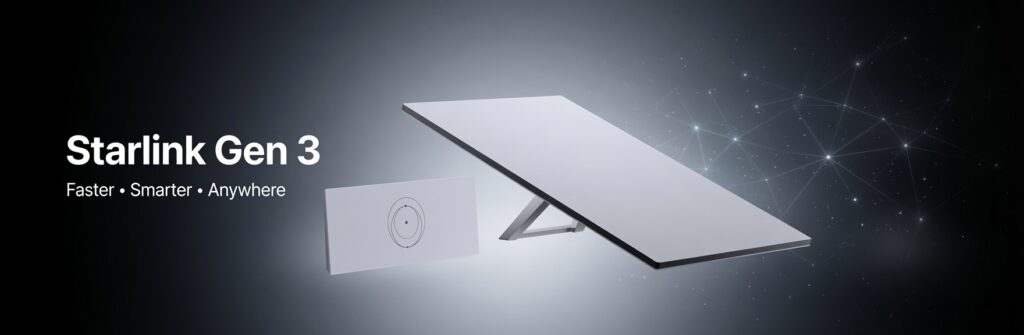
Complete Starlink Gen 3 Kit Guide
Starlink is now fully operational across Kenya, and the Gen 3 Standard Kit is the current hardware available to new subscribers. If you are trying to understand what comes in the kit, what the total cost looks like, how installation works, or where to buy a genuine unit in Nairobi, this guide covers all of it.
You can browse the Starlink Gen 3 Standard Kit and accessories at Fedi Office Supplies here.
What Is the Starlink Gen 3 Standard Kit?
The Starlink Gen 3 Standard Kit, sometimes listed as V3 or Standard Gen 3 V4 on Kenyan retailer sites, is the current generation of Starlink residential hardware. It replaced the older round actuated dish (Gen 2) in late 2023 and is the only new standard kit available in Kenya today.
The Gen 3 is a flat rectangular dish with a built-in kickstand, a separate Wi-Fi 6 router, and a 15-metre cable. It is designed for homes, small businesses, NGOs, farms, lodges, and offices that need fast, reliable internet where fibre and mobile networks are absent or unreliable.
Important note on naming: When you see “Starlink Gen 3”, “Starlink V3”, “Starlink Standard Gen 3”, or “Starlink Standard V4” listed by different Kenyan sellers, these all refer to the same hardware. The naming inconsistency comes from Starlink’s own product labelling across different markets. You are buying the same dish regardless of which of these names a Kenyan retailer uses.
What’s in the Starlink Gen 3 Standard Kit Box?
When you receive the kit, here is what you get:
- The Gen 3 flat rectangular dish with built-in kickstand (no motors alignment is handled digitally via the Starlink app)
- Gen 3 Wi-Fi 6 router (flat, horizontal design with 2 built-in Gigabit Ethernet ports)
- 15-metre cable with standard RJ45 connectors (not proprietary like Gen 2)
- Power supply unit
- Basic ground/table stands for temporary placement
What is NOT included that you may need:
- A roof mount, wall mount, or pole mount for permanent installation (sold separately)
- An Ethernet adapter, if you want additional wired ports beyond the 2 on the router
- Extended cables of 15 metres are insufficient for your installation
Starlink Gen 3 Technical Specifications
| Specification | Detail |
| Dish type | Fixed flat rectangular panel |
| Alignment | Electronic (no motors) — 110° field of view |
| Download speeds | 25–220 Mbps (depending on plan and congestion) |
| Upload speeds | 5–20 Mbps |
| Latency (Kenya) | 25–60 ms (since Nairobi PoP activation, January 2025) |
| Router standard | Wi-Fi 6 (tri-band) |
| Router coverage | Up to 3,200 sq ft (approx. 300 sq m) |
| Built-in Ethernet ports | 2 x Gigabit LAN on router |
| Cable length (included) | 15 metres (RJ45 connectors) |
| Power consumption | Approx. 75–100W during operation |
| Weather resistance | IP67 rated |
| Operating temperature | -30°C to +50°C |
| Frequency compatibility | 50Hz / 60Hz |
Starlink Gen 3 vs Gen 2: Key Differences for Kenyan Buyers
Many Kenyans buying a Starlink kit for the first time wonder what changed between generations. Here is what matters practically:
Wi-Fi 6 instead of Wi-Fi 5
The Gen 3 router handles multiple simultaneous connections significantly better. If you have a household or office with many devices, the Gen 3 handles congestion with far less lag in testing, and buffer bloat was reduced by around 30% compared to Gen 2.
Built-in Ethernet ports
The Gen 2 router had no Ethernet ports; you needed to buy a separate adapter. The Gen 3 router has two built-in Gigabit Ethernet ports, useful for connecting smart TVs, desktop computers, or network switches without extra cost.
Standard RJ45 cable connectors
Gen 2 used proprietary connectors. Gen 3 uses industry-standard RJ45. This makes cable extensions easier and cheaper.
No motors — no failure point
The Gen 2 actuated dish had motors to physically align the dish toward satellites. The Gen 3 uses a wider 110-degree field of view and software alignment instead. This removes a common mechanical failure point.
Better router range
Gen 3 router covers approximately 3,200 sq ft vs. the Gen 2’s 2,000 sq ft. For large homes, offices, or lodges, this makes a meaningful difference.
Lower power consumption
The Gen 3 standard dish draws approximately 75–100W during operation, which matters for off-grid setups on solar or generator power.
Starlink Gen 3 Price in Kenya
Here is an honest, complete breakdown of all the costs involved in getting Starlink Gen 3 running in Kenya:
Hardware (One-Time Purchase)
| Item | Price (KSh, excl. VAT) |
| Starlink Gen 3 Standard Kit (dish + router + cable) | KSh 45,000 – 55,000 |
| Roof/wall mount (if needed for permanent install) | KSh 8,500 |
| Ethernet adapter (for additional wired ports) | ~KSh 10,000 |
At Fedi Office Supplies, the Starlink Gen 3 Standard Kit is currently priced at KSh 52,000 (excl. VAT). Check current availability here →
Monthly Subscription (Paid Directly to Starlink)
Note: Subscriptions are paid directly to Starlink via their app. These are not charged by the hardware retailer.
| Plan | Monthly Cost (KSh) | Data |
| Residential 50GB | ~KSh 1,300 | 50GB cap |
| Residential Lite | ~KSh 4,000 | Unlimited, lower priority |
| Residential (Standard) | ~KSh 6,500 | Unlimited, higher priority |
| Roam / Mobility | KSh 8,000 – 14,000 | Unlimited, portable use |
| Business Priority | From ~KSh 32,000 | Guaranteed bandwidth |
Most households and small businesses use the Residential plan at KSh 6,500/month — it offers unlimited data at higher network priority, suitable for streaming, video calls, and remote work.
Professional Installation
| Service | Cost (KSh) |
| Standard installation (roof or wall mount) | KSh 5,000 – 8,500 |
| Complex or high-point mounting | KSh 8,500+ depending on requirements |
Total first-year cost estimate for a typical home user:
Kit: KSh 52,000 + Installation: KSh 6,500 + 12 months subscription (KSh 6,500/month): KSh 136,500 total first year
From year two: only the monthly subscription (~KSh 78,000/year at current Residential rates)
Starlink Gen 3 Installation in Kenya: What to Expect
Can You Install It Yourself?
Yes. The Gen 3 kit is designed for self-installation. Starlink provides a free app (iOS and Android) that uses your phone’s camera to scan the sky and identify obstructions, such as trees, buildings, and rooftops, before you commit to a mounting position. The setup process, once mounted, is straightforward: connect the cable, plug in the router, and follow the app.
The kickstand built into the dish means you can set it on a flat surface (ground, roof, terrace) and be online in under 20 minutes. For temporary or portable use — caravans, remote site visits, farm deployments — self-installation is perfectly reasonable.
When Professional Installation Is Recommended
For permanent installations, a professional installer gives you significantly better results and long-term reliability. Here is when to use one:
Roof mounting
Getting the dish high and unobstructed is critical for maximum speeds. A professional will identify the optimal mounting point, route cables neatly through the roofline, and waterproof all penetrations so rain doesn’t enter the building.
High-obstruction environments
In Nairobi’s dense urban areas, buildings and trees regularly block the dish’s view of the sky. A professional site survey identifies whether a higher mounting point or roof pole is needed before you spend money on installation.
Complex cable routing
Running cable through walls, ceilings, or conduit over longer distances requires the right tools and expertise to avoid signal degradation.
Permanent lodges, farms, NGO offices
Installations that need to last years in exposed outdoor conditions should be done properly the first time.
The Professional Installation Process (Step by Step)
- Site Survey and Obstruction Check
Before any mounting, the installer uses the Starlink app and physical inspection to identify the clearest available view of the sky. The dish needs a clear, unobstructed view of the sky directly above and toward the north. Even a single tree or roof corner blocking 5% of the sky can reduce performance noticeably. - Mounting Selection
Depending on your building, the installer selects the best mount option:
- Kickstand/ground mount — For flat rooftops or terraces with no obstructions
- Wall mount — Fixed to an exterior wall at a height
- Roof mount — Fixed to roof tiles, fascia, or eaves
- Pole mount — For installations needing extra height to clear trees or buildings
- Cable Routing and Protection
The 15-metre cable that comes with the kit connects the dish directly to the router. The installer routes this cable neatly inside the building through a waterproofed wall entry point, protecting it from weather and pests. If longer cable runs are needed, Starlink sells 25-metre and 45-metre cables (also available at Fedi). - Router Placement and Wi-Fi Setup
The router is positioned centrally in the building for optimal coverage. The installer runs initial speed tests, checks latency, and optimises Wi-Fi channel settings where needed. - App Configuration and Handover
The Starlink app is set up on your phone, allowing you to monitor signal quality, obstruction percentage, data usage, and run manual speed tests. A good installer walks you through this before leaving.
What Affects Starlink Performance in Kenya?
Obstruction is the biggest factor. A single tree or building blocking a corner of the sky can reduce your speeds by 20–50%. Use the Starlink app’s obstruction check before finalising the dish position. If the obstruction score is above 5–10%, consider a higher or different mounting point.
Your subscription plan determines priority. The Residential plan (KSh 6,500/month) gives you unlimited data at a higher network priority. The Residential Lite plan (KSh 4,000/month) is unlimited but deprioritised during peak hours — meaning if the local Starlink satellite is busy, Lite users get slower speeds first.
The Nairobi PoP (January 2025) massively improved latency. Before Starlink activated a dedicated Point of Presence in Nairobi in January 2025, Kenyan data was routed through international servers, resulting in a latency of 80–120ms. After the Nairobi PoP, average latency dropped to 25–60ms — making Starlink now suitable for Zoom, VoIP, online gaming, and cloud business applications that the older satellite latency made unreliable.
Power supply quality. Kenya’s grid power can fluctuate. Using a UPS or voltage stabiliser on your Starlink router and power supply protects the equipment from surges during load shedding recovery or grid switching events.
Who Is Starlink Gen 3 Best For in Kenya?
Homes in rural Kenya
Where Safaricom fibre doesn’t reach, and mobile data is slow or congested. Starlink delivers consistent 50–150 Mbps speeds with no data caps on the Residential plan.
Safari lodges and eco-camps
Guest Wi-Fi and operational connectivity in remote conservancies, national parks, and off-grid properties. Starlink is now the internet backbone for dozens of Kenyan lodges.
NGOs and development organisations
Field offices, project sites, and remote health facilities where reliable internet is mission-critical. Many NGOs procure Starlink through established Nairobi suppliers like Fedi Office Supplies.
Farms and agribusinesses
Smart farming, CCTV monitoring, IoT devices, and office connectivity on large farms outside mobile coverage.
Remote schools and institutions
Starlink’s educational access provides reliable connectivity for e-learning platforms, online examinations, and teacher resources at schools underserved by traditional infrastructure.
Businesses outside Nairobi CBD
Small and medium enterprises in Kisumu, Nakuru, Eldoret, Thika, Nyeri, and other towns where fibre is available but congested, unreliable, or not yet deployed to their specific area.
Nairobi homes needing a fibre backup
In areas with frequent fibre outages, Starlink serves as a reliable failover connection.
Starlink Gen 3 vs Starlink Mini: Which Should You Buy?
Fedi stocks both the Gen 3 Standard Kit and the Starlink Mini Kit. Here is how to choose:
| Starlink Gen 3 Standard | Starlink Mini Kit | |
| Price (KSh, excl. VAT) | ~KSh 52,000 | ~KSh 43,000 |
| Best for | Permanent home / office / lodge | Portable, travel, temporary use |
| Download speeds | 25–220 Mbps | 25–100 Mbps |
| Router included | Yes (Wi-Fi 6, separate unit) | Built into the dish |
| Portability | Moderate (with kickstand) | Very portable (compact, lightweight) |
| Power consumption | 75–100W | ~20–40W |
| Ethernet ports | 2 (on router) | Requires adapter |
| Ideal user | Family, business, lodge | Traveller, remote worker, field team |
If you are setting up permanent internet for a home, office, lodge, or farm, the Gen 3 Standard Kit is the right choice. If you need portable internet for travel, field work, or a secondary satellite connection for mobile use, the Mini Kit is better suited.
Frequently Asked Questions
How much does a Starlink Gen 3 Kit cost in Kenya?
The Starlink Gen 3 Standard Kit is priced between KSh 45,000 and KSh 55,000 for the hardware. At Fedi Office Supplies, the current price is KSh 52,000 (excl. VAT). View current stock →
How much is Starlink per month in Kenya?
Monthly plans range from KSh 1,300 (Residential 50GB capped) to KSh 6,500 (Residential unlimited). Most home users and small businesses use the Residential plan at KSh 6,500/month. Subscriptions are paid directly to Starlink via the app using M-Pesa or a card.
How much does Starlink installation cost in Kenya?
Professional installation typically costs KSh 5,000 to KSh 8,500, depending on your mounting requirements. Complex roof or high-pole installations at the higher end.
Does Starlink work in Nairobi?
Yes. Starlink works throughout Nairobi, though performance in dense urban areas with tall buildings is affected by obstructions. A proper elevated mount — on a rooftop with a clear view of the sky — resolves most urban obstruction issues. Latency improved significantly after Starlink’s Nairobi PoP activation in January 2025.
Is Starlink faster than Safaricom fibre?
In urban Nairobi, where fibre is available, fibre typically offers lower latency (under 10ms vs Starlink’s 25–60ms) and more consistent speeds during peak hours. However, Starlink outperforms fibre in any area where fibre isn’t available, is unreliable, or is congested. For rural Kenya and remote locations, there is no comparable alternative.
Can I pay for Starlink using M-Pesa in Kenya?
Yes. Starlink accepts M-Pesa payments directly through the Starlink app for both hardware and monthly subscriptions.
Do I need to buy a mount separately?
The Gen 3 kit includes a kickstand for ground/flat-surface placement. For roof, wall, or pole mounting (recommended for permanent installations), a mounting kit is required and sold separately. Fedi stocks Starlink-compatible mounting accessories.
Can I use Starlink on solar power in Kenya?
Yes. The Gen 3 dish draws 75–100W during operation, making it compatible with most residential solar setups. The power supply accepts 100–240V AC input. For off-grid solar installations, confirm your inverter output is sufficient to run the dish and router continuously.
What is the difference between Starlink Gen 3 and V3 / V4?
These all refer to the same hardware. Kenyan retailers use different names from Starlink’s own labelling across markets. Gen 3, V3, Standard Gen 3, and Standard V4 all mean the same current-generation flat rectangular dish and Wi-Fi 6 router.
Is installation required before subscribing?
No. You can order the hardware and activate your subscription before the dish is permanently installed. Many users run the dish on the kickstand temporarily while planning a permanent mount.
Buy Starlink Gen 3 Kit in Nairobi — Fedi Office Supplies
Fedi Office Supplies is an established electronics and IT supplier based in Nairobi CBD. We stock the full range of Starlink kits, cables, mounts, and accessories, and provide professional installation services across Nairobi and Kenya.
What we offer:
- Genuine Starlink Gen 3 Standard Kits (in stock, ready for same-day collection or delivery)
- Starlink Mini Kits and all Starlink accessories
- Professional installation services — site survey, mounting, cable routing, setup
- Technical guidance to help you choose the right kit and plan for your needs
- Bulk supply for NGOs, institutions, and businesses
📍 Location: Town House Building, Kaunda Street, 6th Floor, Room 606, Nairobi CBD
📞 Call/WhatsApp: +254 114 158 465 | +254 791 386 881
📧 Email: sales@fedi.co.ke
Buy Starlink Gen 3 Kit in Kenya →
Browse All Starlink Products & Accessories →
Fedi Office Supplies — Your trusted Starlink reseller and installation partner in Nairobi, Kenya.